
cancel
Showing results for 
Search instead for 
Did you mean: 

STM32F405RGT6 custom board review

ekremtrn
Associate II

Hello everyone, this is my first post on the forum. I'm starting to learn STM and have created a custom board using the STM32F405RGT6. This is the first board I've created, and I wanted to check for any errors before sending it to production. So I've uploaded a PDF of the connection diagram. I'd be very grateful if you could review it and let me know if there are any mistakes.
1 ACCEPTED SOLUTION

Accepted Solutions

Hello,

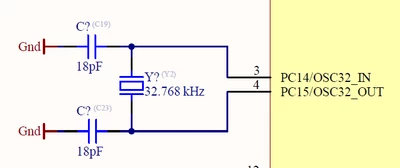
Need to re-check this part of LSE:

mALLEm_0-1763034793828.png

Did you check if the crystal is compatible with the STM32? did you calculate the gain margin based on the crystal characteristics and the load capacitors?

Read How to select a compatible crystal and load capacitors for STM32 with layout guidelines

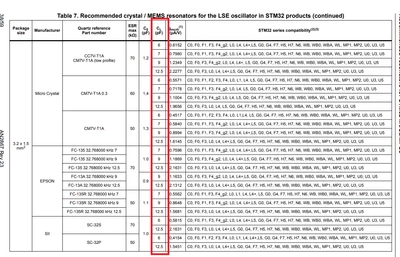
18pf CL looks a bit high compared to the CL recommended for LSE for STM32 in the AN2867

mALLEm_0-1763035265288.png

To give better visibility on the answered topics, please click on "Accept as Solution" on the reply which solved your issue or answered your question.

View solution in original post

9 REPLIES 9
Andrew Neil
Super User

Welcome to the forum.

Please see How to write your question to maximize your chances to find a solution for best results.


@ekremtrn wrote:

 I'm starting to learn STM .


Do you have experience with any other microcontroller(s) ?

Before leaping into a custom hardware design, I would strongly recommend that you prototype & gain experience on a development board - far cheaper & easier to find & fix issues than on a custom design!


Did you study Application note AN5093Getting started with STM32G4 Series hardware development boards?


I don't see any programming/debug connector ?

Have you considered how you will program, debug & test your design ?

See Design For Debug ...


PS:

It would also help to give details on the intended application of this board, and what environment it will operate in - these will affect the design

A complex system that works is invariably found to have evolved from a simple system that worked.
A complex system designed from scratch never works and cannot be patched up to make it work.
TDK
Super User

Looks okay except:

How do you plan to program/debug without a programming header?

If you feel a post has answered your question, please click "Accept as Solution".

Thank you. I intentionally did not add a programming header because I wanted to design a small card. I plan to program it by removing the RTX and CTX from the 10-pin header and connecting it to the USB-A header with an external cable.

Hello,

Need to re-check this part of LSE:

mALLEm_0-1763034793828.png

Did you check if the crystal is compatible with the STM32? did you calculate the gain margin based on the crystal characteristics and the load capacitors?

Read How to select a compatible crystal and load capacitors for STM32 with layout guidelines

18pf CL looks a bit high compared to the CL recommended for LSE for STM32 in the AN2867

mALLEm_0-1763035265288.png

To give better visibility on the answered topics, please click on "Accept as Solution" on the reply which solved your issue or answered your question.

So how do you plan to debug it?

Omitting this capability is a Really Bad Idea!

You don't have to provide a full-sized header - could be just test points accessed with "pogo pins"; eg,

AndrewNeil_2-1763039626829.png

See https://www.tag-connect.com/ for that particular connector.


The absolute minimum for SWD is just 2 connections - data & clock - but it's best to also include RESET.

Again, Design For Debug !

A complex system that works is invariably found to have evolved from a simple system that worked.
A complex system designed from scratch never works and cannot be patched up to make it work.

Thank you, you're right. Do you know where I can find the pogo pin footprint for Altium? I couldn't find it.

https://www.tag-connect.com/contact-us

Or try Altium support/forums


PS:

https://www.tag-connect.com/info/footprint-downloads

A complex system that works is invariably found to have evolved from a simple system that worked.
A complex system designed from scratch never works and cannot be patched up to make it work.

Hello @ekremtrn if your original question has been answered please "Accept as Solution" the post that answered your question. For new questions please open a new thread.

Thank you.

To give better visibility on the answered topics, please click on "Accept as Solution" on the reply which solved your issue or answered your question.

Thank you. I was using a 32.768 kHz ±20ppm Crystal 12.5pF 70 kOhms 2-SMD, No Lead. I will replace it with an FC-135R 32.7680KA-AG3 and use an 8.2 pF Capacitor.