

cancel
Showing results for 
Search instead for 
Did you mean: 

Can't Communicate With Board Anymore But Code Still Runs Fine

gorgabab
Associate II

Hello everyone,

Working on the STM32U5G9ZJT6Q on a custom board.
On STM32CubeProgrammer (V2.20), I face an unexpected issue when trying to program my board.
The ST-Link (official, V3PWR, power not used) simply cannot communicate anymore with the mcu with BOOT0=0 (tied with gnd). The stlink isn't broken as it still works on other custom boards.
Error: Unable to get core ID
Error: No STM32 target found! [...]

With the USB and PH3 BOOT0=1 (tied to Vdd), I can erase the chip and program it, however, when trying to run the program, the mcu resets and gets back into the idle usb waiting mode.
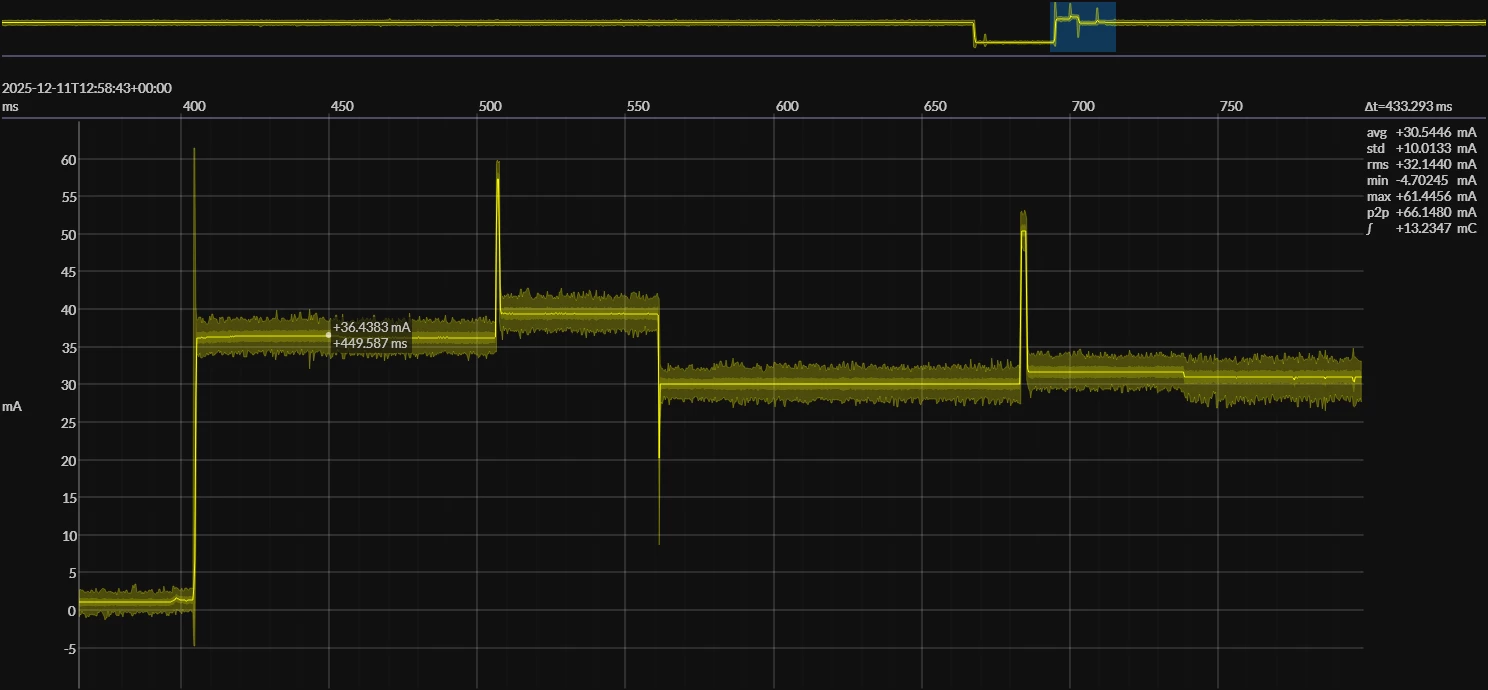
Here is the current consumption diagram without running after programming (left) and with running after programming (right). The base reset pattern for reference is the 3rd image.
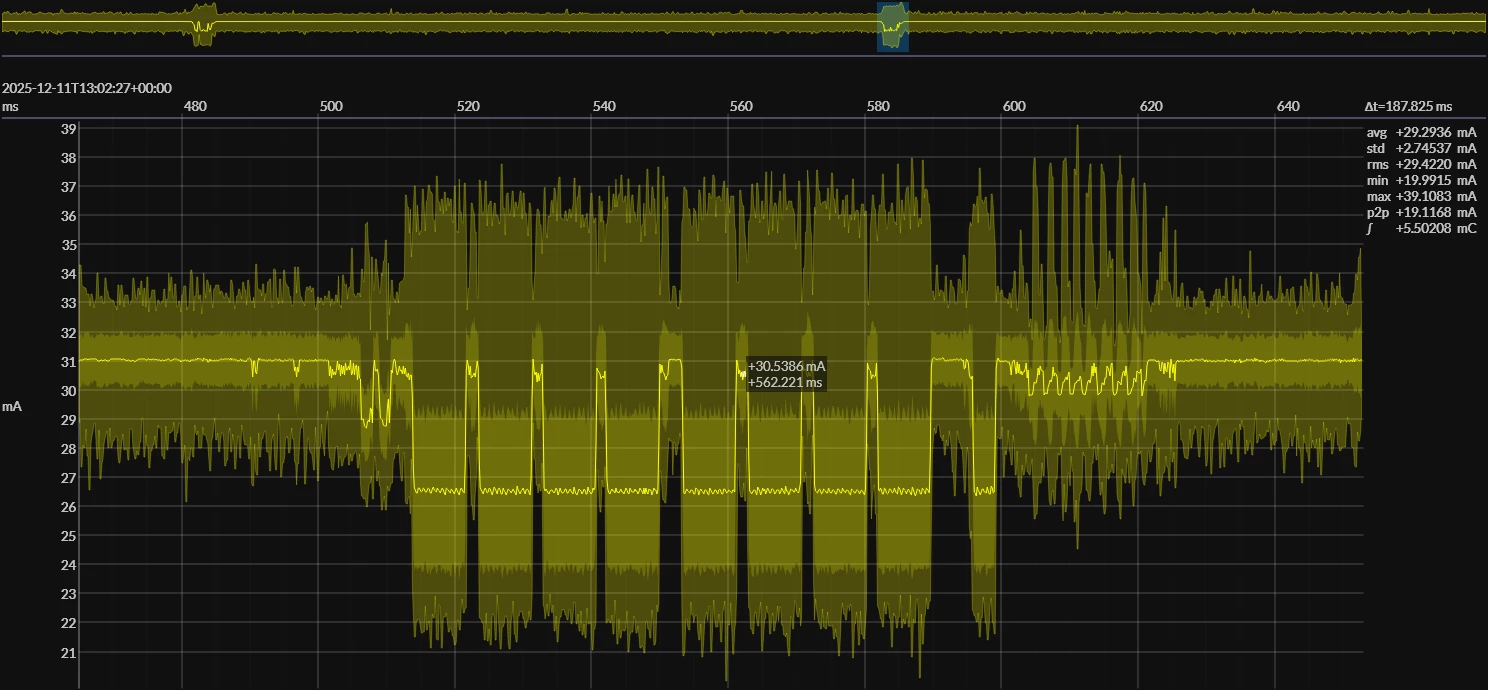
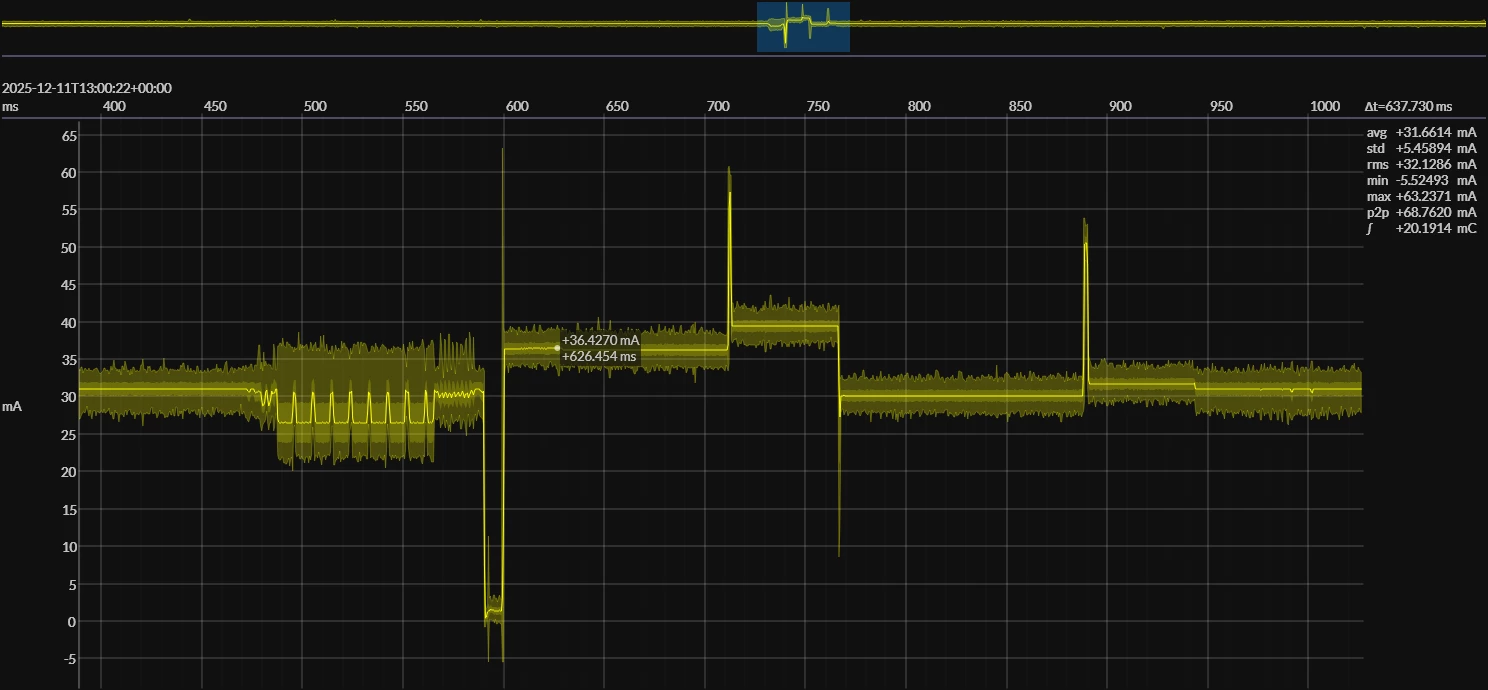
prog_no_run.png prog_and_run.png

simple_reset.png

The run seems to trigger the reset and put it back to idle/wait for device at the bootloader base address.

It's worth noting that with BOOT0=1, stlink still doesn't work. 

I tried all possibilities to communicate with the board from stlink BOOT0=0, especially under reset.
I never had short-circuit on the board or at least not a prolonged one as I monitored the current consumption the whole time.The voltages are correct at the intended levels (VDDA, VDD, VDD core, ...).
It had been working before for weeks, and when I lost the possibility to communicate with the board (BOOT0=0, ST-LINK), the previous uploaded program was still running perfectly fine on the board (a simple internal DAC/VREF). I erased the memory from usb today so no code isn't running anymore.

The whole situation should mean (I hope) that the mcu in itself is not broken, or only the reset/run part, which I find difficult to believe.

6 REPLIES 6
TDK
Super User

If you can connect over USB DFU, the chip is the in the bootloader which means the SWD pins are active. If SWD still can't connect, this suggests a wiring issue. Perhaps a solder joint finally failed.

If you feel a post has answered your question, please click "Accept as Solution".

Hello,

Thanks for your answer, I checked the continuity between the st-link header and the respective stm SWDIO and SWCLK pins and all are ok, they are also quite close from their pin (<2cm).

gorgabab_0-1765882325402.png

As a workaround, I installed a 3-pin header tied to VDD and GND on my board to select the BOOT option. I upload the code on BOOT=1, then changing to 0 while reset the chip to run the code. It works but is nowhere near the comfort brought by the st-link and the debugging options.

I still would like to understand (if anyone went through this situation) what kind of failure can bring the st-link interface not work anymore on my chip as this is the only failure i experience on the board.

The odds for an static choc to break only the st-link part of the chip seem little.


@gorgabab wrote:

what kind of failure can bring the st-link interface not work anymore .


1st two not  "failures" as such, but:

  1. Reconfiguring the SWD pins - see:
    How to solve debugger connection issues
    How to solve connection errors when connecting and programming the STM32 target board.
  2. Protection options:
    A mass erase should fix that.

  3. As @TDK said, physical faults - broken/loose connectors, solder joints failed, etc


A complex system that works is invariably found to have evolved from a simple system that worked.
A complex system designed from scratch never works and cannot be patched up to make it work.

Hi, 

Thanks for the points, I will answer in order to keep track of what I say.

1.a. I reinitialized the debug pins from cubemx without change. Connect under reset was my go to on my previous boards but here it doesn't help unfortunately.

1.b. I only use official products from ST. STLINKV3 firmware is up to date, the peripheral is recognized and also works on other boards. The issue is only on this chip.

2. I erase many times since the issue, and nothing changed.

3. Please find attached the image of the connections. The quality is poor but the state is visually perfect. I'll add that no reheating was applied, nothing fell, etc. I tested the continuinty directly form the upper side of the MCU's pins to the tip of the header (STDC14). No discontinuity appears, and no "soft short circuit". The power supply comes from stable LDO 3.3V (recently re-tested).

gorgabab_0-1765897619027.png


@gorgabab wrote:

1.a. I reinitialized the debug pins from cubemx without change.


But if something in your code then reconfigures the pins, that will override whatever CubeMX did at startup.

Try putting a delay before any of your own code runs - to see if that gives the ST-Link a chance to connect.

Lighting an LED during that delay would help you to "hit" that window.


A complex system that works is invariably found to have evolved from a simple system that worked.
A complex system designed from scratch never works and cannot be patched up to make it work.

You're totally right, I'll develop what I previously tried.

I created a new empty project, with debug serial wire, debug monitor enabled and such. To easily see if the program is properly uploaded, I set a vrefbuf output to 1.5V that is easy for me to probe without any gpio configuration needed. Between uploads, I erase the chip fully to avoid residuals.

Afterwards, I set loooooong delays between each cubemx default initialization instances and performed different connection methods offered by CubeProgrammer.

Also, the chip doesn't embed any security layer that could prevent the erase on specific part.

The code is properly uploaded, but the st-link can't connect to the chip.