

cancel
Showing results for 
Search instead for 
Did you mean: 

Custom model object detection on STM32N6-DK error

mls
Associate III

Hi,

I have build a custom model based on st yolox model.
This model have an input of 480x480. Intput int8 and output float.
Five classes for vehicles detection
Quantized and tested on stm32N6570-DK.
Now i'm trying to add my model on this st example
https://github.com/STMicroelectronics/STM32N6-GettingStarted-ObjectDetection/tree/main
I'm following this tutorial to deploy my model
https://github.com/STMicroelectronics/STM32N6-GettingStarted-ObjectDetection/blob/main/README.md#application-build-and-run---dev-mode

I'm using stm32cubdeIDE to program the card
After i programmed the network_data.hex, i'm trying to deploy and debug the application.
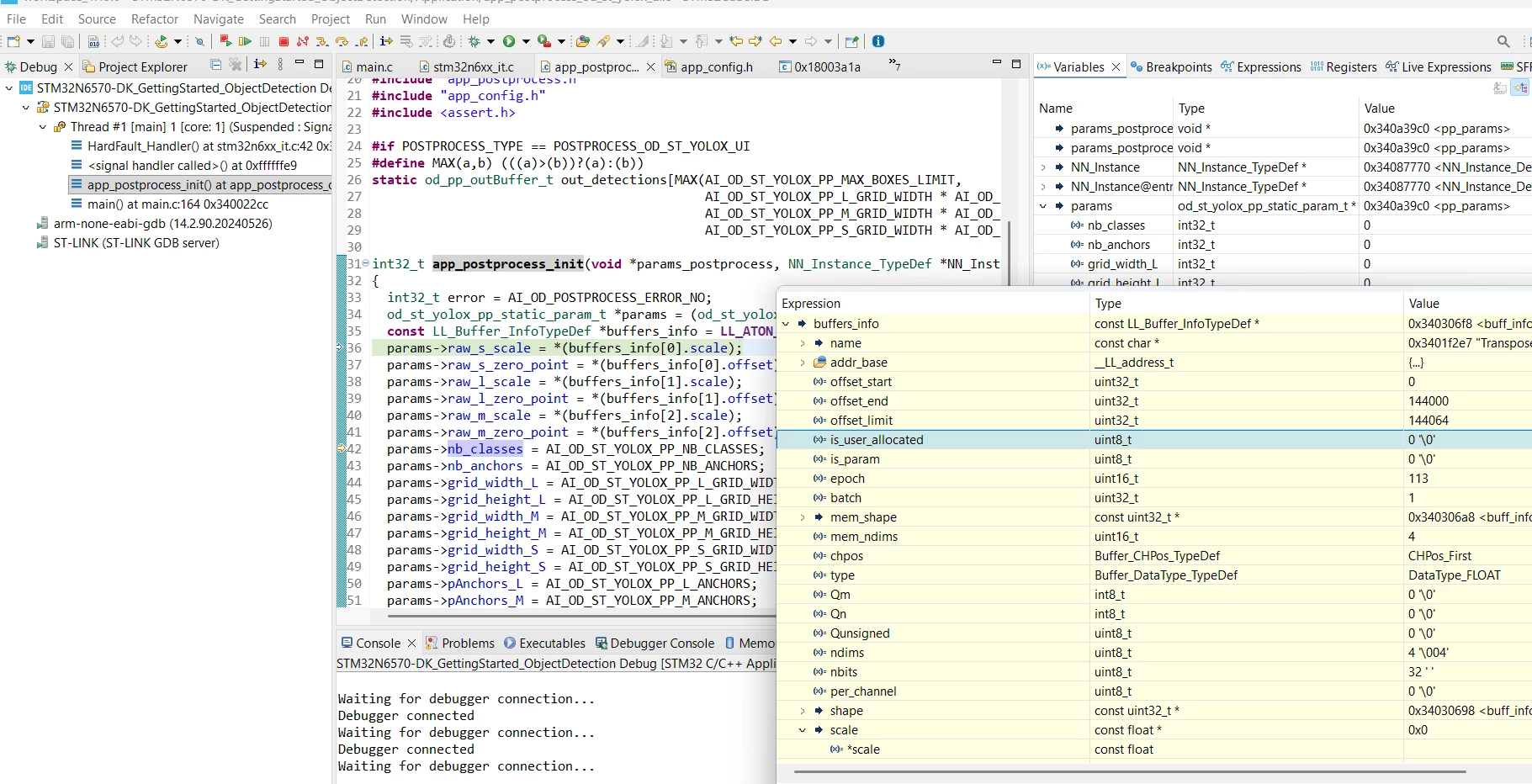
But i have this error at this step : app_postprocess_init
The parameters
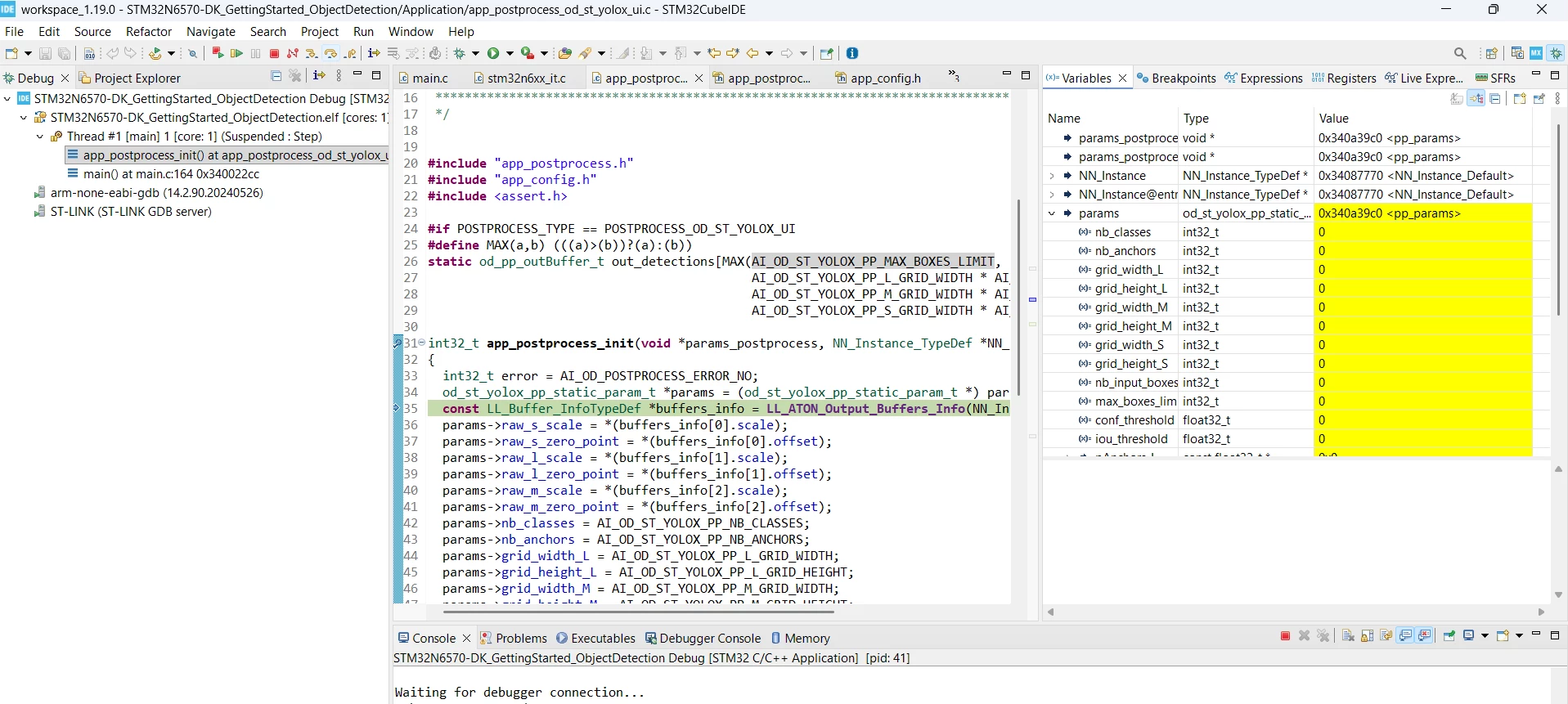
2025-11-17_16h12_42.png

2025-11-17_17h08_34.png


Do you have en idea how i can resolve this ?

10 REPLIES 10
Julian E.
ST Employee

Hi @mls,

Did you edit the app_config.h and the post processing for your model needs?

Please look at this document:

STM32N6-GettingStarted-ObjectDetection/Doc/Deploy-your-tflite-Model-STM32N6570-DK.md at main · STMicroelectronics/STM32N6-GettingStarted-ObjectDetection


Have a good day,

Julian


In order to give better visibility on the answered topics, please click on 'Accept as Solution' on the reply which solved your issue or answered your question.
mls
Associate III

Hi @Julian E.

I found the solution for my first issue ! I quantized a model in int8 (input) and float (output)....not supported in your example.
I quantized my model in uint8/int8 

#define POSTPROCESS_OD_ST_YOLOX_UI      (106)  /* ST YoloX postprocessing; Input model: uint8; output: int8          */


Downloaded the model in the card and launch the debug
Now stuck in Run Inference

mls_0-1763561213766.png


A question ? does the model need to be quantized in input in UINT8 or it could be INT8 ?


Hello @mls,


I think your issue is maybe due to a conflict between the input and output type your model use, you used in the generate command and what the firmware expect (as described in app_config.h)


Can you share the exact command you used (the generate) and your app_config.h


Also, if you can share your model, it would be helpful (in private message if you want).


Have a good day,

Julian


In order to give better visibility on the answered topics, please click on 'Accept as Solution' on the reply which solved your issue or answered your question.

Hi @Julian E. 

Unfortunately for the moment i don't have access to my GPU server (thank you OVH ...) that i used to train the model.
That i did today is to quantize my model (h5 file) with ST Edge AI Developer Cloud.

mls_1-1763567476705.png

All the process is ok 


mls_2-1763567546276.png

See here the app_config.h

I will send you the model by private message


Hi @mls,


When I deploy your model, it works for a few inference before freezing, is that what you also observe?

I am trying to figure out what is happening


Have a good day,

Julian


In order to give better visibility on the answered topics, please click on 'Accept as Solution' on the reply which solved your issue or answered your question.
mls
Associate III

Hi @Julian E. ,

Yes there are probably some inference but nothing that is displaying on the lcd screen.
Let me know if you make some progress on that. We are also testing Alif solution to make a choose on our futur platform to replace our nvivia solutions ...

Regards,

Mickaël

mls
Associate III

Hi @Julian E. ,

Did you make some progress ?

This morning, tried with st_yolo_x_nano_480_1.0_0.25_3_st_int8.tflite original model. Same issue ...

Hi @mls,


manual deployment:

  • copy your model: STM32N6-GettingStarted-ObjectDetection\Model
  • Run the following commands
stedgeai generate --model your_model --target stm32n6 --st-neural-art default@user_neuralart_STM32N6570-DK.json --input-data-type uint8 --output-data-type int8
cp st_ai_output/network.c STM32N6570-DK/
cp st_ai_output/network_ecblobs.h STM32N6570-DK/
cp st_ai_output/network_atonbuf.xSPI2.raw STM32N6570-DK/network_data.xSPI2.bin
arm-none-eabi-objcopy -I binary STM32N6570-DK/network_data.xSPI2.bin --change-addresses 0x70380000 -O ihex STM32N6570-DK/network_data.hex
  • use STM32CubeProgrammer to flash the weights in STM32N6-GettingStarted-ObjectDetection\Model\STM32N6570-DK\network_data.hex
  • Edit STM32N6-GettingStarted-ObjectDetection\Application\STM32N6570-DK\Inc\app_config.h

In your case, you have 5 classes and are using a yolox with input shape 480x480:

/**
******************************************************************************
* @file    app_config.h
* @author  GPM Application Team
*
******************************************************************************
* @attention
*
* Copyright (c) 2023 STMicroelectronics.
* All rights reserved.
*
* This software is licensed under terms that can be found in the LICENSE file
* in the root directory of this software component.
* If no LICENSE file comes with this software, it is provided AS-IS.
*
******************************************************************************
*/

/* ---------------    Generated code    ----------------- */
#ifndef APP_CONFIG
#define APP_CONFIG

#include "arm_math.h"

#define USE_DCACHE

/*Defines: CMW_MIRRORFLIP_NONE; CMW_MIRRORFLIP_FLIP; CMW_MIRRORFLIP_MIRROR; CMW_MIRRORFLIP_FLIP_MIRROR;*/
#define CAMERA_FLIP CMW_MIRRORFLIP_NONE

#define ASPECT_RATIO_CROP (1) /* Crop both pipes to nn input aspect ratio; Original aspect ratio kept */
#define ASPECT_RATIO_FIT (2) /* Resize both pipe to NN input aspect ratio; Original aspect ratio not kept */
#define ASPECT_RATIO_FULLSCREEN (3) /* Resize camera image to NN input size and display a fullscreen image */
#define ASPECT_RATIO_MODE ASPECT_RATIO_FIT

/* Postprocessing type configuration */
#define POSTPROCESS_TYPE    POSTPROCESS_OD_ST_YOLOX_UI

#define NN_HEIGHT     (480)
#define NN_WIDTH      (480)
#define NN_BPP 3

#define COLOR_BGR (0)
#define COLOR_RGB (1)
#define COLOR_MODE COLOR_RGB
/* Classes */
#define NB_CLASSES   (5)
#define CLASSES_TABLE const char* classes_table[NB_CLASSES] = {\
   "bicycle" ,   "motorcycle" ,   "car" ,   "bus" ,   "truck"}\

/* Postprocessing ST_YOLO_X configuration */
#define AI_OD_ST_YOLOX_PP_NB_CLASSES        (5)
#define AI_OD_ST_YOLOX_PP_L_GRID_WIDTH      (60)
#define AI_OD_ST_YOLOX_PP_L_GRID_HEIGHT     (60)
#define AI_OD_ST_YOLOX_PP_L_NB_INPUT_BOXES  (AI_OD_ST_YOLOX_PP_L_GRID_WIDTH * AI_OD_ST_YOLOX_PP_L_GRID_HEIGHT)
#define AI_OD_ST_YOLOX_PP_M_GRID_WIDTH      (30)
#define AI_OD_ST_YOLOX_PP_M_GRID_HEIGHT     (30)
#define AI_OD_ST_YOLOX_PP_M_NB_INPUT_BOXES  (AI_OD_ST_YOLOX_PP_M_GRID_WIDTH * AI_OD_ST_YOLOX_PP_M_GRID_HEIGHT)
#define AI_OD_ST_YOLOX_PP_S_GRID_WIDTH      (15)
#define AI_OD_ST_YOLOX_PP_S_GRID_HEIGHT     (15)
#define AI_OD_ST_YOLOX_PP_S_NB_INPUT_BOXES  (AI_OD_ST_YOLOX_PP_S_GRID_WIDTH * AI_OD_ST_YOLOX_PP_S_GRID_HEIGHT)
#define AI_OD_ST_YOLOX_PP_NB_ANCHORS        (3)
static const float32_t AI_OD_ST_YOLOX_PP_L_ANCHORS[2*AI_OD_ST_YOLOX_PP_NB_ANCHORS] ={30.000000, 30.000000, 4.200000, 15.000000, 13.800000, 41.999999};
static const float32_t AI_OD_ST_YOLOX_PP_M_ANCHORS[2*AI_OD_ST_YOLOX_PP_NB_ANCHORS] ={15.000000, 15.000000, 2.100000, 7.500000, 6.900000, 21.000000};
static const float32_t AI_OD_ST_YOLOX_PP_S_ANCHORS[2*AI_OD_ST_YOLOX_PP_NB_ANCHORS] ={7.500000, 7.500000, 1.050000, 3.750000, 3.450000, 10.500000};
#define AI_OD_ST_YOLOX_PP_IOU_THRESHOLD      (0.5)
#define AI_OD_ST_YOLOX_PP_CONF_THRESHOLD     (0.6)
#define AI_OD_ST_YOLOX_PP_MAX_BOXES_LIMIT    (100)
#define WELCOME_MSG_1         "best_model_PerChannel_quant_int8_float32_random_1.tflite"
#define WELCOME_MSG_2       "Model Running in STM32 MCU internal memory"

#endif      /* APP_CONFIG */

 Finally, open the cubeIDE project to build and run it


With Model zoo:

  1. copy your model in \stm32ai-modelzoo-services\object_detection\models
  2. edit user_config.yaml
general:
  model_path: ./models/best_model_PerChannel_quant_int8_float32_random_1.tflite
  model_type: st_yolo_x
operation_mode: deployment

dataset:
  class_names: [bicycle, motorcycle, car, bus, truck]

preprocessing:
   rescaling:
      scale: 1/255
      offset: 0
   resizing:
      aspect_ratio: fit
      interpolation: nearest
   color_mode: rgb

data_augmentation:
  random_contrast:
    factor: 0.4
  random_brightness:
    factor: 0.3
  random_flip:
    mode: horizontal
  random_translation:
    width_factor: 0.15
    height_factor: 0.15
    fill_mode: reflect
    interpolation: nearest
  random_rotation:
    factor: 0.02
    fill_mode: reflect
    interpolation: nearest
  random_crop:
    crop_center_x: (0.25, 0.75)
    crop_center_y: (0.25, 0.75)
    crop_width: (0.6, 0.9)
    crop_height: (0.6, 0.9)
    change_rate: 0.9

training:
  model:
    input_shape: (480, 480, 3)
    depth_mul: 1.0
    width_mul: 0.25
  dropout: null
  batch_size: 64
  epochs: 550
  optimizer:
    Adam:
      learning_rate: 0.0025
  callbacks:
    LRWarmupCosineDecay:
      initial_lr: 1.0e-05
      warmup_steps: 20
      max_lr: 0.00125
      hold_steps: 20
      decay_steps: 500
      end_lr: 1.0e-06
    EarlyStopping:
      monitor: val_loss
      patience: 60
      restore_best_weights: true
      verbose: 1

postprocessing:
  yolo_anchors: [0.5, 0.5, 0.07, 0.25, 0.23, 0.7]
  confidence_thresh: 0.4
  NMS_thresh: 0.5
  IoU_eval_thresh: 0.5
  plot_metrics: false
  max_detection_boxes: 20

quantization:
   quantizer: TFlite_converter
   quantization_type: PTQ
   quantization_input_type: uint8
   quantization_output_type: float
   export_dir: quantized_models
  
tools:
  stedgeai:
    version: 10.2.0
    optimization: balanced
    on_cloud: False
    path_to_stedgeai: C:/ST/STEdgeAI/2.2/Utilities/windows/stedgeai.exe
  path_to_cubeIDE: C:/ST/STM32CubeIDE_1.18.1/STM32CubeIDE/stm32cubeide.exe

deployment:
  c_project_path: ../application_code/object_detection/STM32N6/
  IDE: GCC
  verbosity: 1
  hardware_setup:
    serie: STM32N6
    board: STM32N6570-DK

mlflow:
   uri: ./src/experiments_outputs/mlruns

hydra:
   run:
      dir: ./src/experiments_outputs/${now:%Y_%m_%d_%H_%M_%S}
 
  • run: python stm32ai_main.py


please note that you can have any input and output type for your model. When generating the C model, the model is edited to have uint8 input and int8 output:

stedgeai generate --model st_yolo_x_nano_480_1.0_0.25_3_st_int8.tflite --target stm32n6 --st-neural-art default@user_neuralart_STM32N6570-DK.json --input-data-type uint8 --output-data-type int8
 
Then you need to use the  POSTPROCESS_OD_ST_YOLOX_UI postprocessing
 
In the model zoo yaml, you should take a look at the postprocessing, mainly the number of boxes and the threshold. 
 
Have a good day,
Julian

In order to give better visibility on the answered topics, please click on 'Accept as Solution' on the reply which solved your issue or answered your question.
mls
Associate III

Hi Julian,

Thank you  for your answer. Just tested your flow but same result. Whit my model it didn't work ..

mls_0-1765548258134.png

Have you tested with my model ??