cancel
Showing results for 
Search instead for 
Did you mean: 

AEK-POW-BMSCCTX wont connect via SPI to AEK-MCU-C4MINI development board

ritehracingteam
Associate II

Dear ST,

As you can see from the title we have issues with our SPI connection to the BMS board. 

We wired everything properly to the BMS connector, checked all the connections, on the MCU-C4mini shorted the JP pins (JP1 and JP2 and JP3 1-2, JP4,JP5,JP12,JP13).

We also flashed the pre-built project from AutoDevkit studio (AEK-MCU-C4MINI - AEK_POW_BMSCCTX_GUI_application for discovery) to the MCU.

Followed all the steps.

We didn't connect any thermistors, and we only have 4, 3.2V LiFePo4 batteries.

On the BMS, only the LEDS D2, D8(Blue) and D9 were lit up ~~ we assume the SPI connection is not being established correctly. We hooked up the SPI lines to a osciloscope, please find attached our readings. If needed I can also send a additional osciloscope reading picture.

The yellow line is supposed to be the CLK line, we measured from the tiny peak to peak freq of 5MHz, the freq of the whole clock frame was 10kHz.

Please advise how to continue with troubleshooting. 


Best regards,

Gabrijel Vincek

1 ACCEPTED SOLUTION

Accepted Solutions

Hi Gabrijel,
1) Actually, the L9963E datasheet paragraph you are pointing (6.10.2) make no sense on the current HW implementation. (AEK-POW-BMSCCTX).
If you look at the AEK-POW-BMSCCTX schematic:

SRomeo_0-1763990164947.png
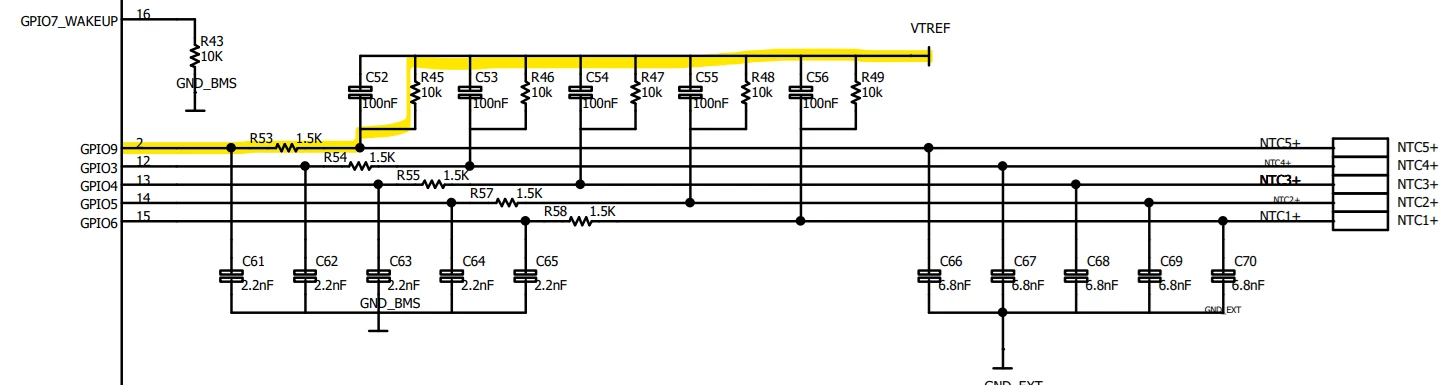
GPIO3-4-5-6-9 are pulled-up to VTREF. No ground connection is required. You have to leave NTCx pins floating.

2) If you want to use current sense: R61=100ohm is the value configured into one of L9963E registers. This information is used by the IC to evaluate from the voltage between IsenseP/IsenseM, the current flowing.
For standard use you do not have to calculate any resistance at all.
If you do not use embedded current sense: Just stick to the scheme I've already shared, shorting GNDext to C0.

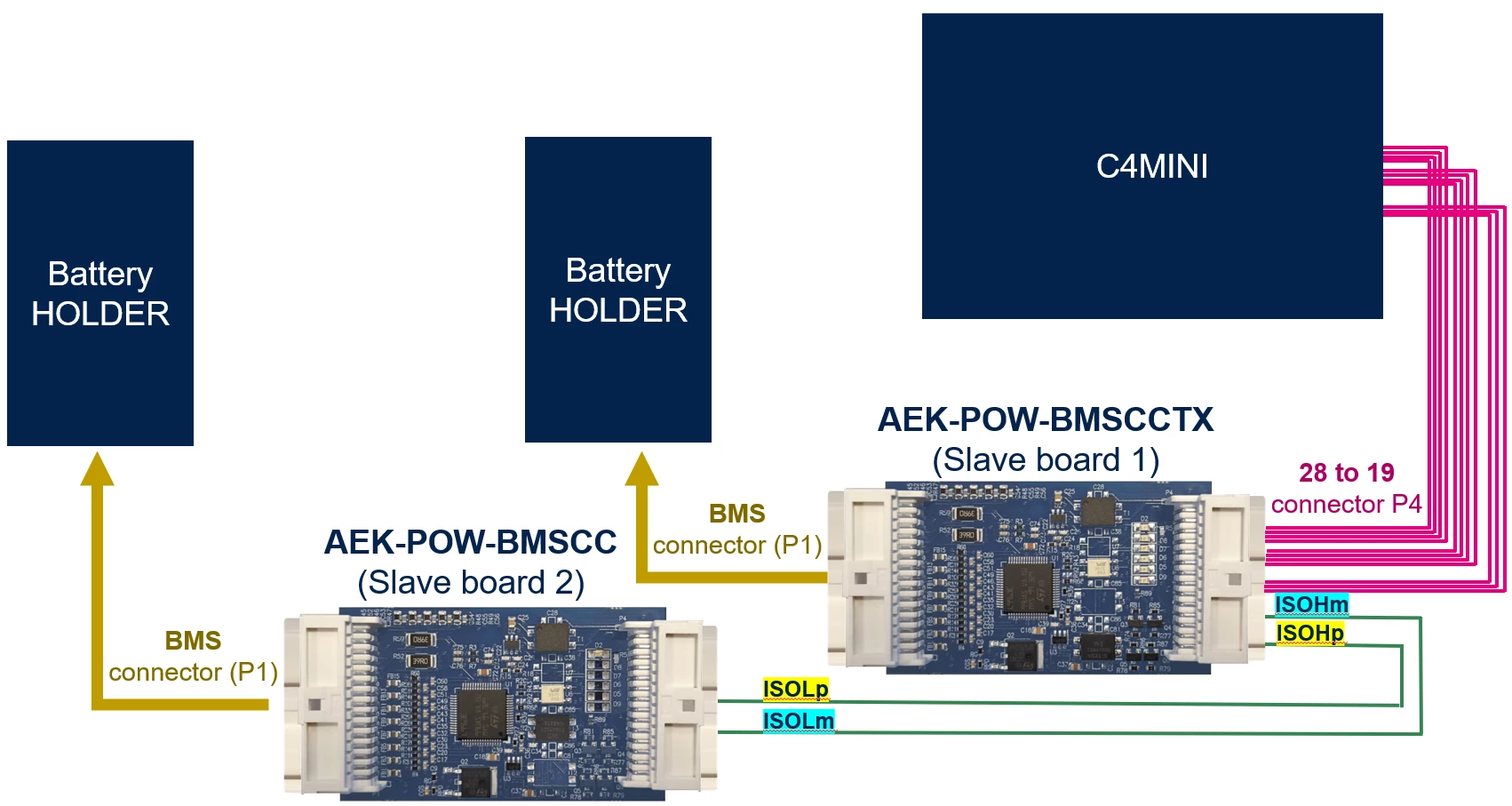
3) No. ISOH/ISOL are used to establish ISOSPI communication with another BMS board (AEK-POW-BMSCC).
This way you can connect up to 31 BMS boards in daisy chain, driving them with the same MCU board.

SRomeo_1-1763991090044.png
(2xBMS Nodes:    AEK-POW-BMSCCTX  +  AEK-POW-BMSCC  example)
Considering you have just 1 node (BMSCCTX) you can leave these pins floating.

Best regards
Simone
AEK_Team


View solution in original post

10 REPLIES 10
Amal_V
Associate III

Hi Gabrijel,

I am having the issue of flashing the project to the C4MINI mcu (I have shared the issue in the attachment). Can you share what all steps you did for successfully completing the flashing process. 
I am also trying to do the same project. We could help each other to complete the process.

Thank You.

Amal Viswam

ritehracingteam
Associate II

Hey @Amal_V ,

We managed to get the BMS working and get the voltage readings. Next problem is ~ the first cell shows the wrong voltage, I think i found out the issue - We didn't short the GPIO pins on the BMS, and we didn't short the Isense+ and - pins to the GND, so make sure to short them if you're not using them. Same goes with ISOh and ISOm lines on the transciver. You can find this in L9963E datasheet under "Unused pins".


Regarding your issue I will share our steps with you now:

Connect the AEK-MCU-C4MINI board to the PC via USB cabel via the onboard usb-mini(A).

After that we followed the AEK-MCU-SPC5LNK_QSG_reduced.pdf guide, we installed the AEK_MCU_spc5LNK.bat file.

Then we opened the BMS-CCTX node project, went to build folder and found the "out.elf" file, we then copied the file path of it. We went into the "Debug mode" by clicking the bug icon on the top right. After that Clicked on the bug icon on the left with the down pointing arrow and pressed on debug configurator. There we went under "GDB OpenOCD debugging" pressed on SPC58ECxx (I believe you might have made a mistake here and chosen the wrong chip type, check you c4mini SPC58 chip, its most surely is the EC), after which we pasted the before copied path into C/C++ application. 

The application was built and uploaded to the MCU. Make sure before you enter debugging you "build" and savethe project.


If you're using a custom cell amount (we are using 4), you have to change the settings of your bms. We did it as follows:

ritehracingteam_1-1763975827766.pngritehracingteam_2-1763975882508.png

Disabled the cells we werent using, went down and changed the voltage levels to fit our cells. We didn't touch any other settings. After we did that we saved the project, pressed on "ALOCATE PINS", generate application code and compile application. 

After which we went into PinMap editor, unassigned all of the allocated pins and opened a new application and copied the pin layout from the pre-built project there, making sure that while selecting the type of the pin(input,output, or I/O) select the coresponding type of the pin and their correct settings as shown below:

ritehracingteam_3-1763976689368.png

Generate, compile and go into debug- and debug. Should work now. Make sure all connections are correct. Also make sure to go into Board View and double check if all the pins on the MCU board are applied correctly. 


Hope any of this helps!


Best regards,

Gabrijel Vincek


SRomeo
ST Employee

Hi Gabrijel,
It seems there are 2 main issues in your HW configuration, let me guide you through the correct settings:

1) "less than 14 cells" battery packs requires ad-HOC wiring
L9963E (BMSCCTX core IC) requires at least 4 batteries to work properly, but batteries have to supply C0/C1/C2 - C12/C13/C14 BMS pins.

This means that the correct HW wiring for a 4cell battery pack is the following:

SRomeo_0-1763976487832.pngSRomeo_2-1763977035048.png

In case you want also to measure pack current, then you should mount R61 and add Isense wires as follows:

SRomeo_1-1763976897358.pngSRomeo_3-1763977138851.png
R61 value shall be set via SW in the configurator (default demo value=100ohm)

2) CLK behavior suggest no GND reference
This happens due to the HPP section (Hot plug protection) displayed below

SRomeo_5-1763977826093.png

HPP pin needs to be wired to one of the 2 reference voltages (VREG or VTREF) to assure ground continuity.

SRomeo_6-1763978110620.png
This should be your P4 configuration (heading to your C4MINI, assuming you are using the project: AEK-MCU-C4MINI - AEK_POW_BMSCCTX_GUI_application for discovery).

Best regards,
Simone
AEK_Team


@ritehracingteam Thanks for the reply. It helped me so much.

I am using 8 cells and i didn't short the unused ones. Thank you.

Since i am using 8 cells, i have to connect first 4 from C0,C1...C4 and last 4 cells from C11 to C14. Rest C4-C11 i should short. Right??

Also on the P4 side , should we have to do anything to pin GND_BMS? or only 13 connections from P4 is enough??.

Also can u also share what did you gave in the executable name. Debug configuration->GBD OpenOCD debugging->SPC58ECxx_RLA AutoDevKit Studio generic->Debugger tab->GDB Client setup->Executable name.
Amal_V_0-1763982044289.png


Thank you for helping me @ritehracingteam  

@Amal_V , glad to hear it helped!


Yes you should short, check reply from @SRomeo.

I was also wondering the same thing about the GND for P4.

ritehracingteam_0-1763983226524.png

C: AutoDevKitStudio-2.6.1\eclipse\plugins\com.st.tools.spc5.tools.gnu.gcc.ppcvle.win32_4.9.4.202504281937\toolchain\bin\ppc-freevle-eabi-gdb.exe

I think we had to re-select the same file, after that it worked (: 


@SRomeo thank you for your reply. Luckily we managed to figure it out. HPP and VTREF are shorted now.
I have a few questions regarding wiring for unused gpio-s and current sense. 

1. We are not using any NTC sensors right now as we have none (we just want to measure voltage for testing purposes), does that mean that we have to short all GPIO (3,4,5,6,9) to GND, or is just one enough? 

ritehracingteam_0-1763982315537.png

Also to which pin can i short to GND? Can i just short it to pin GND_EXT?


2. For current sense to work I can just solder a 100OHM resistor to the R61 pad as shown before, or do I need to calculate the proper resistance for our 4 bat pack? If I do not want to use current sense (in our real application this will be done externaly via a hall effect sensor on the main busbar out), I understand that I have to short them but to what pin can i short them? Can I just connect it aswell to GND_EXT? Or do I need to connect them to GND_BMS? If this is the case then we don't have any proper isolation...

3. Do I need to short the Isoh_Isop pins on the transiver side? for our project (AEK-MCU-C4MINI - AEK_POW_BMSCCTX_GUI_application for discovery)


Best regards,

Gabrijel Vincek

Hi Gabrijel,
1) Actually, the L9963E datasheet paragraph you are pointing (6.10.2) make no sense on the current HW implementation. (AEK-POW-BMSCCTX).
If you look at the AEK-POW-BMSCCTX schematic:

SRomeo_0-1763990164947.png
GPIO3-4-5-6-9 are pulled-up to VTREF. No ground connection is required. You have to leave NTCx pins floating.

2) If you want to use current sense: R61=100ohm is the value configured into one of L9963E registers. This information is used by the IC to evaluate from the voltage between IsenseP/IsenseM, the current flowing.
For standard use you do not have to calculate any resistance at all.
If you do not use embedded current sense: Just stick to the scheme I've already shared, shorting GNDext to C0.

3) No. ISOH/ISOL are used to establish ISOSPI communication with another BMS board (AEK-POW-BMSCC).
This way you can connect up to 31 BMS boards in daisy chain, driving them with the same MCU board.

SRomeo_1-1763991090044.png
(2xBMS Nodes:    AEK-POW-BMSCCTX  +  AEK-POW-BMSCC  example)
Considering you have just 1 node (BMSCCTX) you can leave these pins floating.

Best regards
Simone
AEK_Team


Dear Simone,


Thank you very much for your reply. Everything makes a lot more sense now! 

I just want to confirm that for the Isense resistor you mean we should use 100 mili OHM resistor? In the datasheet and in SW(AutoDevKit) it says the resistance is in miliohms. (See attached)

ritehracingteam_0-1763998495520.png


Also please note at the same picture, if GPIO is not used, do we just leave it on Analog Input, or do we change it to Digital input? (Please look at 6.10.2.1 in L9963E datasheet)


Also we couldn't find any explanation in the datasheets or in AutoDevKit regarding the following settings:

ritehracingteam_1-1763998741590.png

We understand that they are sample times, but what is the difference between N cycle GPIO Thermal and just GPIO, 

is there a table or datasheet explaining what each variable means? We would love to know what each variable does. 


Best regards,

Gabrijel Vincek

SRomeo
ST Employee

Hi Gabrijel,
Yes, you are right, the rshunt default value is 100milli ohm.

Regarding GPIO mode, it is better to set every unused GPIO into digital input mode (this way the IC wont' perform the voltage conversion procedure referred to that GPIO)

Ncycle and Tcycle are values that may span from 000 to 111.
The table you see in the BMS component allow you to set a specific timing for BMS cyclic conversion routine.

SRomeo_0-1764059900961.png

Based on the intersections of these 2 values you select the routine duration.
Tcycle = time of cycles  Ncycle = number of cycles

You can individually change the duration of some routines. In particular:

Tcycle_sleep: (used only when the IC is in cyclic wakeup, else Tcycle is used)
Ncycle GPIO thermal: *errata GPIO term, should refer to "GPIO terminal open" periodicity.

Ncycle cell thermal: *errata CELL term, should refer to "cell terminal open" diagnostic periodicity.
Ncycle GPIO: Refferred to GPIOs, the intersection with Tcycle define the ADC voltage conversion period.
Ncycle HWSC: Referred to HardWare Self Check, performs a BIST periodically, which trigger Configuration Override when a fault is percieved. 
Ncycle Bal term: Referred to cell Balancing, balance terminal OPEN diagnostic periodicity.

For further information take a look to L9963E Datasheet

Best regards
Simone


@SRomeo @ritehracingteam  I am trying to use 8 cells in BMSCCTX . As per Romeo's instruction, i connected the cells to the bms.

Amal_V_0-1764137631879.png

This is how i connected I shorted C4,C5,C6,C7,C8,C9,C10. I also shorted Isense+ and Isense- to GND_EXT as i am not using that. 

When i connect this to my battery pack D2 lights up for only 1 min and then turns off. When i reconnect once more , same thing happens. Is there any wrong in the connection?