gaurav2
Associate II
June 3, 2016
Question

Virtual COM Port: UART over USB for STM32F072

  • June 3, 2016
  • 3 replies
  • 1342 views
Posted on June 04, 2016 at 00:28

Dear all,

I am trying to get UART (USART?) working over USB for a STM32F072C8 part. The idea is to get basic getc/putc working via the USB for a custom board that we have designed. I intend to make the device  look like CDC class to the Windows Host PC so that I can use a Putty or Hyper-term to just get the output (UART Tx from STM32) on a console terminal.

I looked at the sample code in STM32CubeF0 for USB_Device/CDC_Standalone for the STM32F072B_Eval project. Obviously this is for the Discovery or similar boards while our board is custom and different set of peripherals are used.

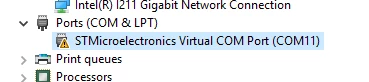
In any case, I had hoped to pull out the essential components but the USB device is not recognized by the host PC.  The Win Device Manager has an error/warning triangle mark.

Question - what are the things that I should look at and how do I proceed with the debug? The example seems to use 48MHz clock called USE_USB_CLKSOURCE_CRSHSI48 in the main.h file. However, we have a 12 MHz crystal on our board.

Can somebody tell me where all and what all do I have to change from the STM32CubeF0 Project for _Eval to get it going with 12MHz?

Many thanks!

0690X00000604uvQAA.png

    This topic has been closed for replies.

    3 replies

    Tesla DeLorean
    Guru
    June 3, 2016
    Posted on June 04, 2016 at 00:51

    The HSI is an internal clock, your external 12 MHz will only come into play if you enable it, and the PLL to generate an alternate 48 MHz clock.

    Tips, Buy me a coffee, or three.. PayPal VenmoUp vote any posts that you find helpful, it shows what's working..
    gaurav2
    gaurav2Author
    Associate II
    June 3, 2016
    Posted on June 04, 2016 at 01:12

    Thanks Clive. That makes sense then. I should expect to get the COM port working with the HSI (high speed internal) oscillator of 48MHz itself.

    Any further ideas why I might be getting ''error code 10 - this device cannot start?'' message in the Device Manager?

    slimen
    Visitor II
    June 6, 2016
    Posted on June 06, 2016 at 10:26

    Hi,

    About''error code 10 - this device cannot start?'', it can be related to theHS max packet size.

    You can refer to this

    https://my.st.com/public/STe2ecommunities/mcu/Lists/cortex_mx_stm32/Flat.aspx?RootFolder=https://my.st.com/public/STe2ecommunities/mcu/Lists/cortex_mx_stm32/STM32F429%20USB%20error%20code%2010&FolderCTID=0x01200200770978C69A1141439FE559EB459D7580009C4E14902C3CDE46A77F0FFD06506F5B&currentviews=37

    tomore understand about this issue.

    Regards