
Mechatronz
Associate
June 29, 2018
Question

STM32 timer misses count in Input Capture mode

  • June 29, 2018
  • 8 replies
  • 9034 views
Posted on June 29, 2018 at 10:16

Hi everyone. I am using STM32F303RE and STM32L011 nucleo boards as a part of my experiment. I used STM32F303RE to generate PWM signal (in Interrupt mode) for 1MHz.

Clock Source - PLLCLK (8Mhz * 9 = 72 MHz).

Timer Period = 71

PWM pulse = 35 (for 50% duty cycle)

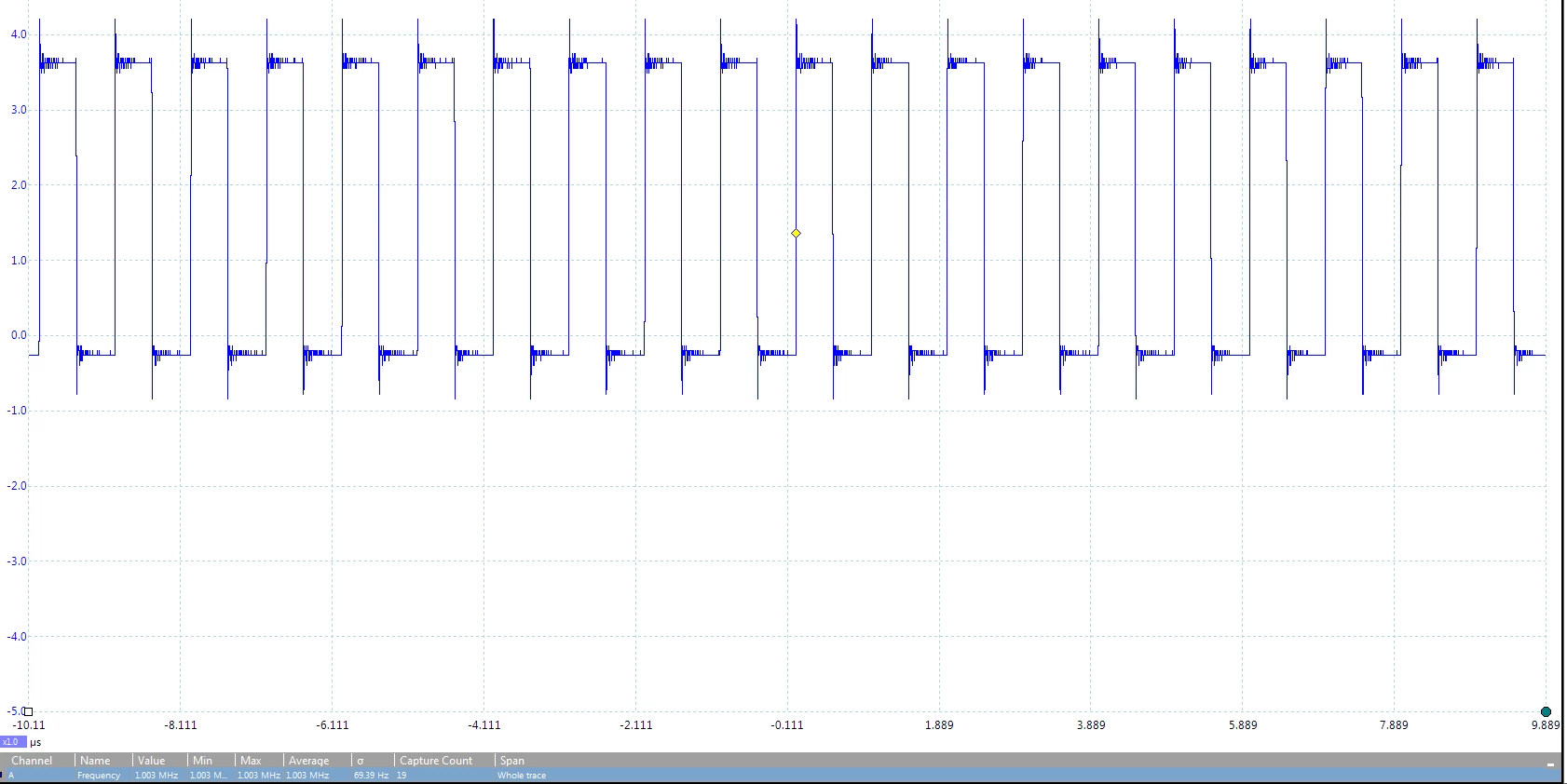
I used picoscope to measure the frequency. You can see the image below.
0690X0000060LXDQA2.png

Now, i set up the STM32L011 in input capture mode (interrupt mode) to capture this 1 MHz signal. It has 32MHz clock source. The input signal is divided by 8 ( sConfigIC.ICPrescaler = TIM_ICPSC_DIV8;)

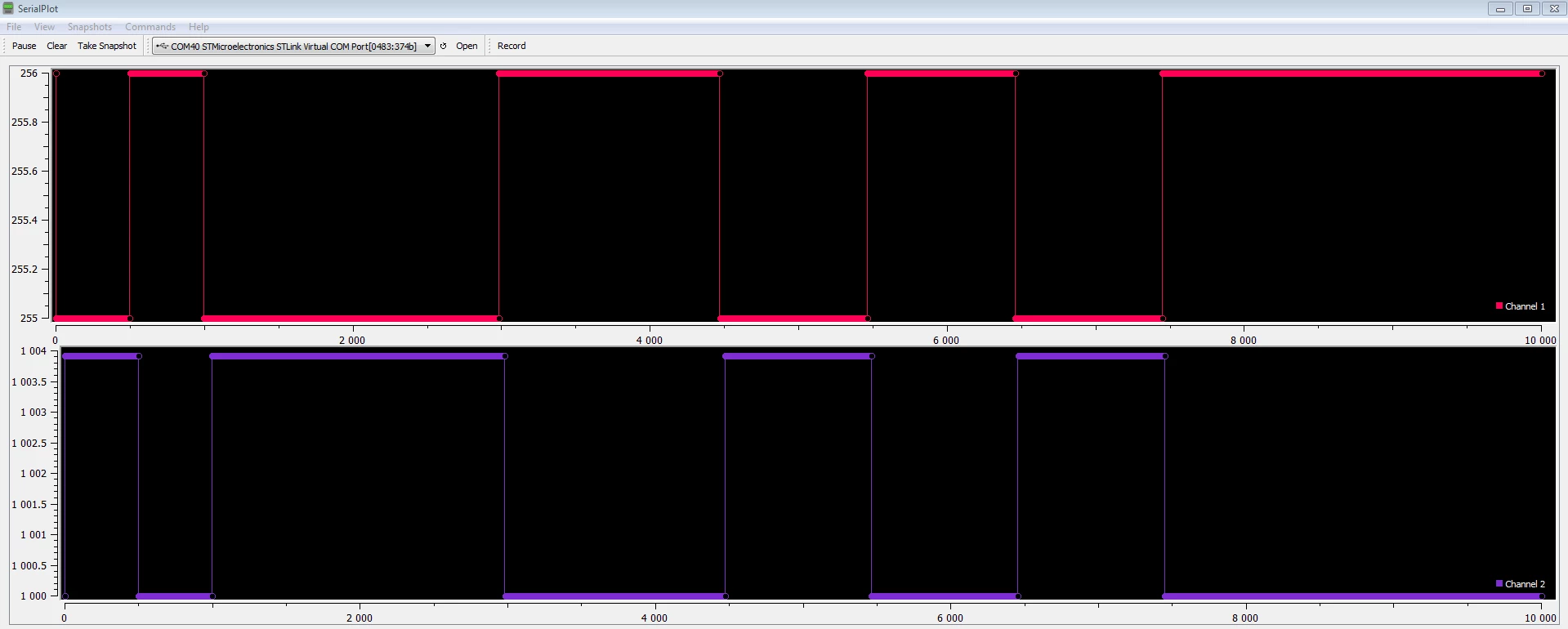
In Interrupt mode, i used CCR register to get the captures done. I read it through UART in serial plot.
0690X0000060LXEQA2.png

As you can see, the timer misses a count. I don't know the problem behind this but this always happens. The timer always misses a count. I tested with different signals but got the same result. Even tried PWM with STM32L011 and captured in another controller, but the result is the same.

Here is the capture_flag_function that i use to get the values

void capture_flag_function (void)

{

switch(capture_flag)

{

case 1:

compare_value = htim2.Instance->CCR1;

break;

case 2:

capture_new = htim2.Instance->CCR1;

CAPTURE_sm = BUFF_FULL;

break;

default:

break;

}

}

by comparing compare_value and capture_new, i obtain the count value.

if(capture_new > compare_value)

count_new = capture_new - compare_value;

if(capture_new < compare_value)

count_new = 65536 - compare_value + capture_new;

Does anyone have an idea of the problem I am facing? Or can you give me suggestions if I am doing something wrong. Thank you.

#count #stm32f303 #stm32-timer-counter #timer-interrupts #frequency-detection #stm32l0-timer #stm32f303-timer

Note: this post was migrated and contained many threaded conversations, some content may be missing.
This topic has been closed for replies.

8 replies

henry.dick
Associate II
June 29, 2018
Posted on June 29, 2018 at 13:16

'

Does anyone have an idea of the problem I am facing?'

touch to tell, as some of the numbers don't make sense to me, with the few lines of code shown.

a high probability event here is that your fast capturing event was blocked by your slow uart transmission event. If I were you, I would significantly slow down the input signal to make sure that your code has no logic flaws and go from there.

btw, that if statement to calculate count values is totally unnecessary.

Mechatronz
Associate
June 29, 2018
Posted on June 29, 2018 at 13:34

The numbers make sense if you see to the frequency that I have mentioned. I will state it more clearly for you.

     freq = 256000 /capture; //freq in kHz. 8*32000kHz. As i have divided the input signal by 8.

now, for example, freq = 256000/255 (as mentioned in figure) = 1004 kHz (approx.)

My project involves measuring the high frequency input signal ( upto 2 MHz). This is not from a PWM source but a different hardware setup. I already slowed it down using the division option from the timer, which i have mentioned already.


And for that if statement, it is absolutely necessary as I am not resetting the timer every time I encounter a rising/falling edge. It is necessary to take care of the overflow.

So, neglecting all the sarcasm, I wanted to know the problem faced because of the accuracy of the internal clocks. This occured when I tried to measure higher frequency. See the image below.

0690X0000060LS5QAM.png

Now, the picoscope measurement of the same frequency.

0690X0000060LYBQA2.png

As you can see, the counts are pretty much good but not accurate enough. There is always count miss of 1-2, whether it is a lower frequency or higher.

With regard to the UART, I tried in debug mode without any UART transmission. Guess what? The same thing happens.

0690X0000060LYGQA2.png0690X0000060LYLQA2.png

I hope you got my point now.

Tesla DeLorean
Guru
June 29, 2018
Posted on June 29, 2018 at 14:52

When N = 72

Period = N - 1  (71)

Pulse = N / 2   (36) 50% duty

The delta math is completely unnecessary when using uint16_t unsigned math

uint16_t a, b, delta;

delta = b - a; // Works of ALL values for a MAXIMAL TIMER, ie 0-65535

Pretty sure your math doesn't work for a counter that rolls 0-71, assuming your other chip is in maximal mode

Not sure how it sets the flag changing state

Not clear from description what TIM2 settings are.

A more complete presentation of code would be better than selective cut-n-paste, and prose describing what it is supposed to do.

Tips, Buy me a coffee, or three.. PayPal VenmoUp vote any posts that you find helpful, it shows what's working..
T J
Senior III
June 30, 2018
Posted on June 30, 2018 at 03:09

I would make the timer run as fast as possible,

not this:

The input signal is divided by 8 (  sConfigIC.ICPrescaler = TIM_ICPSC_DIV8;)

Mechatronz
Associate
June 30, 2018
Posted on June 30, 2018 at 10:23

Thank you for your reply. If you have sometime, please go through the specs of STM32L011 and STM32 F303RE. You will get to know their maximum frequency is 32 and 72 MHz respectively (without use of any external clock). The timers can support till that extent. Now, the setting you specified is for the incoming signal. Input capture is done for every 8 pulses of input. So, I am slowing down the input and not the clock. Hope you get that right. Also, I tried reducing it to DIV4, DIV2 and then DIV1, but it got worse. For higher frequency range, the timer suffered in getting the counts right and the noise level was high.

So, answering your question, the clocks are running at high speed (as much as possible). Also, please refer to my previous replies for more information. Thank you.

T J
Senior III
June 30, 2018
Posted on June 30, 2018 at 14:38

Lets go back to the beginning,

I don't have an STM32L processor here..

Now, i set up the STM32L011 in input capture mode (interrupt mode) to capture this 1 MHz signal. It has 32MHz clock source.  The input signal is divided by 8 (  sConfigIC.ICPrescaler = TIM_ICPSC_DIV8;)

you have a STM32L011 running at 32MHz

you want to capture a signal at 1MHz  (roughly 32 clock cycles per rising edge...  maybe 45ish)

you count 8 pulses of an input event then interrupt ? on a capture counter/timer in counter mode ? yes ?

is that in counter mode or timer mode ?  which timer is that ?

where do you set the count to 8 ?

in that interrupt you read a different free running timer ?

is that this one ? htim2.Instance->CCR1;

Show me the code here:

In Interrupt mode, i used CCR register to get the captures done. I read it through UART in serial plot.  huh ?

what is this picture serialPlot ?,

from a uart pin ?  what is the bottom axis time trace  in mSeconds ? what is the left axis ?
Mechatronz
Associate
June 30, 2018
Posted on June 30, 2018 at 14:49

Thank you again for your reply. It seems clearly that you didn't go through my previous replies. I have stated the timer settings there. I will do it once again for you.

/* TIM2 init function (STM32L011 32MHz max frequency) */

static void MX_TIM2_Init(void)

{

  TIM_ClockConfigTypeDef sClockSourceConfig;

  TIM_MasterConfigTypeDef sMasterConfig;

  TIM_IC_InitTypeDef sConfigIC;

  htim2.Instance = TIM2;

  htim2.Init.Prescaler = 0;

  htim2.Init.CounterMode = TIM_COUNTERMODE_UP;

  htim2.Init.Period = 65535;

  htim2.Init.ClockDivision = TIM_CLOCKDIVISION_DIV1;

  if (HAL_TIM_Base_Init(&htim2) != HAL_OK)

  {

    _Error_Handler(__FILE__, __LINE__);

  }

  sClockSourceConfig.ClockSource = TIM_CLOCKSOURCE_INTERNAL;

  if (HAL_TIM_ConfigClockSource(&htim2, &sClockSourceConfig) != HAL_OK)

  {

    _Error_Handler(__FILE__, __LINE__);

  }

  if (HAL_TIM_IC_Init(&htim2) != HAL_OK)

  {

    _Error_Handler(__FILE__, __LINE__);

  }

  sMasterConfig.MasterOutputTrigger = TIM_TRGO_RESET;

  sMasterConfig.MasterSlaveMode = TIM_MASTERSLAVEMODE_DISABLE;

  if (HAL_TIMEx_MasterConfigSynchronization(&htim2, &sMasterConfig) != HAL_OK)

  {

    _Error_Handler(__FILE__, __LINE__);

  }

  sConfigIC.ICPolarity = TIM_INPUTCHANNELPOLARITY_RISING;

  sConfigIC.ICSelection = TIM_ICSELECTION_DIRECTTI;

  sConfigIC.ICPrescaler = TIM_ICPSC_DIV8;

  sConfigIC.ICFilter = 0;

  if (HAL_TIM_IC_ConfigChannel(&htim2, &sConfigIC, TIM_CHANNEL_1) != HAL_OK)

  {

    _Error_Handler(__FILE__, __LINE__);

  }

}

As mentioned in previous replies, I clearly said that this problem exists even If I set the IC prescaler to DIV1 or DIV2 or DIV 4.

To answer your question about UART, i am reading through the USB serial connection. No dedicated wires for the sake of UART. But this doesn't matter as I tried without UART, in debug mode. Again, please refer to the pictures that I posted to reply Dhenry.

Regarding the interrupt, I am running a timer to capture the input signal. And with the code you are right. I am using CCR register to get the captures, as I have already stated before. Also, I tried in DMA mode with less CPU intervention as I thought this may solve the problem. Guess what? Same thing happens. The timer misses a count and then gets back to the expected value, which happens frequently. Again, as I mentioned before, this happended for even higher frequencies. It is always that single count or two (in some cases) that causes the accuracy issue.

Again, I am requesting you not to deviate from the main problem. I am stating again this clearly. UART is not the issue here. Please go through my previous replies on what has been discussed here and then make a comment. Thank you for your effort.

T J
Senior III
June 30, 2018
Posted on June 30, 2018 at 15:01

I cannot be sure about your code without rewriting it completely.

I use the cube so that everything is done correctly.

are you using one timer or two ?

I don't think you understand Input Capture and prescalers..

please check your reference manual.

16.3.5 Input capture mode

In Input capture mode, the Capture/Compare Registers (TIMx_CCRx) are used to latch the

value of the counter after a transition detected by the corresponding ICx signal.

This does not count 8 rising edges and grab a different timer value...

Mechatronz
Associate
June 30, 2018
Posted on June 30, 2018 at 15:09

I am using single timer with the above given configurations.

Let me tell what I understood, correct me if I am wrong.

In Input capture mode, the CCR register latches to that value of counter after a rising/falling transistion is detected. Basically, If i am measuring a signal continuously, CCRx (current transition) - CCRx (previous transistion) will give me the counts between the two edges (provided that no overflow happens). I hope I am doing good till this point.

Using the IC callback feature, I used the values of CCRx register to get two

consecutive

values. So, if the input is of constant frequency,  I should be reading the same value. Am I right?
T J
Senior III
June 30, 2018
Posted on June 30, 2018 at 15:16

Your text above looks good,

but where is the div 8 ?  you are counting slower , div 1 is the fastest counting.

you are getting an interrupt every 1uSec ?  = 1MHz  <- this is your issue

is that correct ?

Mechatronz
Associate
June 30, 2018
Posted on June 30, 2018 at 15:19

I am not getting an interrupt every 1µSec. It varies a bit. Thats the issue here.

And I am slowing down the input signal just to improve accuracy. Its better to count few pulses and providing a value. Even if i keep the setting to DIV1, the same thing happens. It gets worse when I go to higher frequency, whether its IT or DMA.

Dan Mackie
Associate III
July 5, 2018
Posted on July 05, 2018 at 15:44

I don't think using the debugger is a good idea at all when you are doing the kind of measurement you are doing.  It is fine to use it to establish the code, but when testing performance, prove your code and the hardware without any use of the debugger.  Run for long enough that you establish solid rates, and then output your evidence as required, but not using the debugger.  Further, if you are looking for an interrupt every 1 usec, have you looked at the total instruction time of your interrupt handler, or as has been said earlier, guaranteed that no other interrupts are happening?

Mechatronz
Associate
July 5, 2018
Posted on July 05, 2018 at 15:52

Thank you for your response. I used debugger only as a last resort. If you just scan through the whole page, I would have mentioned about obtaining values through UART and not debugger. Also, I am using STM studio which is a run-time monitor I believe. 

To answer your question, my interrupt handler takes less than 500nSec.

Dan Mackie
Associate III
July 5, 2018
Posted on July 05, 2018 at 19:03

My original statement should be revised to include not using the debugger or any I/O except what you are measuring, and to measure into memory only.  After you have run long enough in this mode to have seen your problem twice in the previous setup, if you have not seen the problem, then you have isolated the issue - it is the debugger, or serial I/O that is giving you the skew.

Dan Mackie
Associate III
July 6, 2018
Posted on July 06, 2018 at 16:23

We are assuming that the generated signal is 100% perfect, and the problem is in the counting.  That assumption might be wrong.  Further, interrupt skew can certainly cause problems. It is not expensive to use a different faster machine as the source of the input data stream, (say the F429i at 216 Mhz, or the F7xx, you have options) and see what happens to your figures using the same counting machine.  You might also do the same with the input machine - use a faster machine, and see what happens to your accuracy.  Having certainty on all the interrupt sources also seems important to me.  You can use a vector table so that all interrupts are trapped and identified.