
XPong.1
Visitor II
January 6, 2021
Question

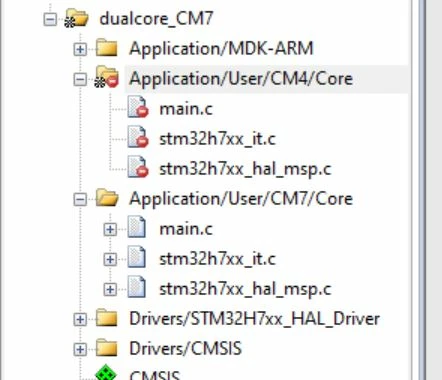
How to solve "object file renamed" this problem? for STM32H745 DualCore MCU
  • January 6, 2021
  • 3 replies
  • 5476 views

0693W000006Hdx0QAC.jpg0693W000006HdwvQAC.jpgWhen I use Keil MDK V5.30 build target file,it cames. So how can I solve it.

This topic has been closed for replies.

3 replies

l.kopp
Associate II
October 14, 2021

Did you solved the problem ?

Tesla DeLorean
Guru
October 14, 2021

Check that it is building into different directories for each sub-project​

Tips, Buy me a coffee, or three.. PayPal VenmoUp vote any posts that you find helpful, it shows what's working..
l.kopp
Associate II
October 14, 2021

Yes I use this to build two different Project Targets with different versions of the HAL Drivers. Each Target have a own Output Folder and even wehen I delete alle .o-Files in the folder this message occures.

simosilva
Senior
October 20, 2021

This occurs when the build contains two files with the same exact name, make sure every other "main.c" "stm32h7xx_it.c" and stm32h7xx_hal_map.c" is EXCLUDED in the current target build options.

Right click on the file on project view, then "Option for target", then uncheck include in Target Build in the screen you posted for the CM4.

In the same way, check the box in the CM7 files making sure the check is black and not grey.

0693W00000FD6F8QAL.png
