Terence D
Associate III
October 27, 2017
Question

Anyone Ever Get The STM32F4 Virtual COM Port Working w/Windows 10?

  • October 27, 2017
  • 4 replies
  • 17241 views
Posted on October 27, 2017 at 06:07

I see multiple people having this problem but not seen an answer why or a solution: The Virtual COM Port driver (1.4) is not working for Windows 10 users. I have the same problem. I download the Driver from:

http://www.st.com/en/development-tools/stm32-utilities.html?querycriteria=productId=LN1729

I run the installation process and also note in the contained readme.txt it says:

How to use

***************

1- Uninstall previous versions (Start-> Settings-> Control Panel-> Add or remove programs)

2- Run your ''VCP_V1.4.0_Setup.exe''

3- Go to Your installation directory - Example, C:\Program Files (x86)\STMicroelectronics\Software\Virtual comport driver

4- Go to Your OS version directory ([Win7] or [Win8])

+ Then :

- Double click on dpinst_xexe if you are running a 32-bits OS version

- Double click on dpinst_amdexe if you are running a 64-bits OS version

+ Follow the instructions.

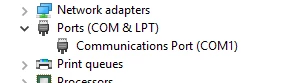
Since I have 64 bit Windows 10 I rundpinst_amdexe. The installation appears to work, but no ''ST Microelectronics'' COM port shows up in my device manager, only COM1:

0690X00000608ldQAA.png

I am quite certain COM1 is in no way related to my STM32F411 board. Anyone know how to get this to work?

Note: this post was migrated and contained many threaded conversations, some content may be missing.
    This topic has been closed for replies.

    4 replies

    Ant M
    Associate II
    October 27, 2017
    Posted on October 27, 2017 at 15:46

    I have had it working on windows 10. It is more likely to be the firmware.

    As a basic working example for the F429 Discovery board have a look at the link below, I assume you have tried the ST examples?

    https://github.com/Ant1882/STM32F429-Tracealyzer-Demo


    Even if you don't have this board, you may spot something in the code. I also found this document to be quite useful:

    https://blog.brichacek.net/wp-content/uploads/2015/10/STM32F4-and-USB.pdf


    The version of USB driver I have on my system is v1.3.1, I can't vouch for v1.4.0.

    Ant

    Terence D
    Terence DAuthor
    Associate III
    October 27, 2017
    Posted on October 27, 2017 at 21:57

    Ant - Thanks for the reply!  I actually have an STM32F429 board in addition to my STM32F411.  I built the Tracealyzer demo, flashed it to the board and the 'STMicroelectronics STLink Virtual COM Port' magically appeared under 'Ports' in 'Device Manager'.  Yay!!

    However, what I don't understand is what exactly happened with the board/software/driver that caused the COM port to work.  I've studied the 'USB F4 VCP Device' section of the PDF you've linked to but nothing there is making it entirely clear why this suddenly works.

    At first I figured the COM port appeared because the Tracealyzer software running on the board activated certain peripherals to cause the 'connection' to happen.  However, since then I've flashed different software (like just a simple light blink example), I unplug the board, plug it back in and it's surprising to me that the COM port for the 

    'STMicroelectronics STLink Virtual COM Port' still appears.

    Can you provide any insight into why this happens?  Just trying to understand this better.  Thanks in advance.

    Terence

    Ant M
    Associate II
    October 28, 2017
    Posted on October 28, 2017 at 17:00

    Glad it worked!

    It sounds like the device may not be enumerating, which is why you have nothing in device manager.

    Even if you don't 'connect' to the device, it should show up in device manager on your PC as plugging it in starts the enumeration process and establishes the connection. It could be clock related, or maybe you are missing the USB interrupts being enabled (check in CubeMX).

    Maybe see if you can output the 48 MHz USB clock on the MCO pin to verify... can't remember off the top of my head if you can actually do that.

    Best Regards,

    Ant

    Max Vilimpoc
    Visitor II
    January 14, 2019

    I had a similar issue with the STM32L476 Virtual ComPort (VCP) not working properly, even though it seemed like all the drivers on Windows should have been in place after installing both ST-LINK004 and Atollic TrueSTUDIO 9.2.0.

    Instead, I chose to wipe out all of those installed drivers and install the 64-bit Windows 8 VCP driver from the STSW-STM32102 package (even though the README says not to), and everything worked fine after that. I've written this up here, with before/after screenshots -- https://vilimpoc.org/blog/2019/01/13/stm32-virtual-com-port-issues/

    The software running on the STM32 chip was straight from ST's own SensorTile samples, precompiled and unmodified.

    pedro1
    Associate III
    April 22, 2019

    Thanks for the suggestion Max. I posted a question about this on your website.

    EDIT - I used the STM32102 driver that you recommended and got a VCP connection https://imgur.com/a/Zxiqvui thanks. Thing is, once I flash my board with another program where I want to use a USB VCP connection, I will loss this VCP. What am I missing please and I apologise for my very low skill level but I want to learn 8)

    Max Vilimpoc
    Visitor II
    May 3, 2019

    Hmm. Not sure about that, I can only speak to the STM32L476 VCP implementation as working.

    Could be a difference somewhere in the STM32CubeMX drivers, I know I had to fiddle around with mine a little at one point to increase the TX / RX buffers, but that was more due to data dropping out. Enumeration of the device in Windows was fine once I'd installed those drivers.

    Not sure if they are using different USB vendor id:product id numbers for the different drivers, or if they all use the same ones across different firmware examples.

    andreaspiezia9
    Associate III
    May 3, 2019

    Hi,

    the VCP cannot be used:

    Starting from Windows® 10, the STSW-STM32102 driver is no more adequate and the usage of the native inbox driver is recommended.

    But what is native inbox driver?

    Max Vilimpoc
    Visitor II
    May 3, 2019

    This isn't strictly true. STSW-STM32102 did work for me, on Windows 10 Pro, in January 2019.

    Sometimes, when all of the other drivers don't work, the older ones somehow do and you just have to suck it up and use them.

    Release notes are one thing, actually testing the drivers out is another.

    pedro1
    Associate III
    May 9, 2019

    Yes as stated above this is exactly my experience too. Sometimes things are not supposed to work but they do. Give it a try - you have nothing to lose @andreaspiezia9 :grinning_face: