mike louaillier
Associate III
July 18, 2017
Question

70F6, can't configure RCC for use with USB

  • July 18, 2017
  • 3 replies
  • 4351 views
Posted on July 18, 2017 at 23:12

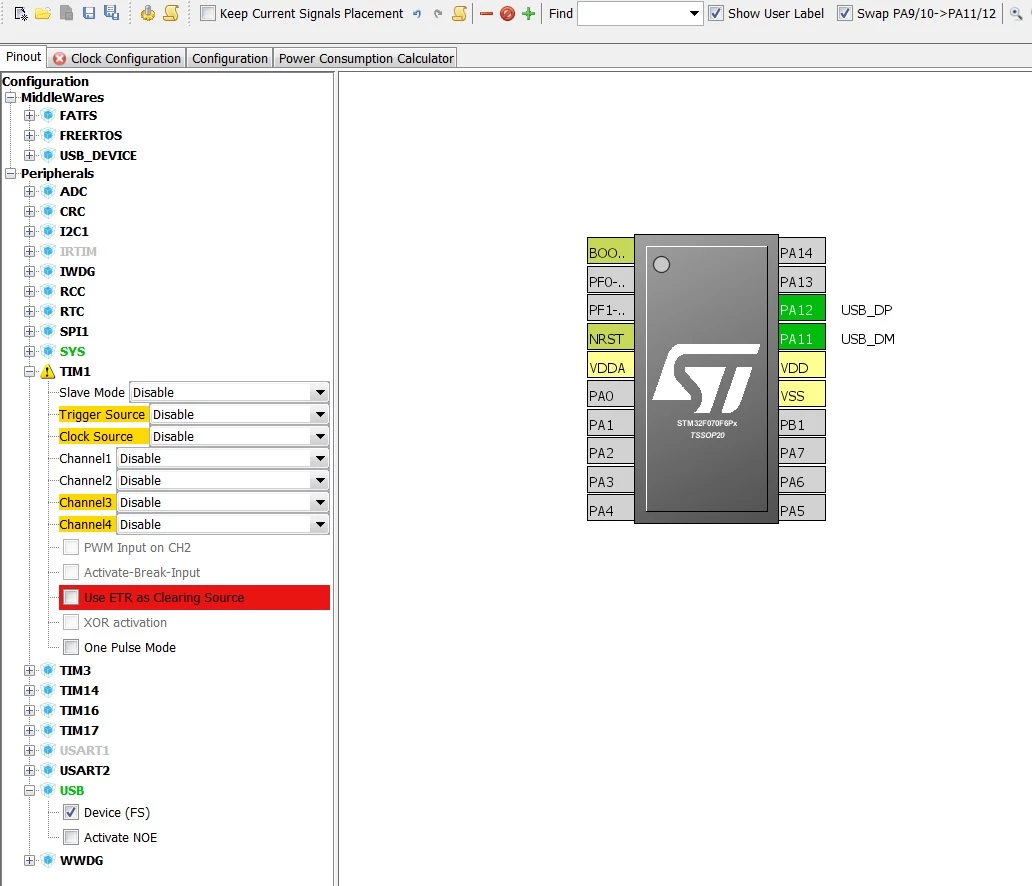
Hello i'm using CUBE 4.22 and i keep getting a conflict (see jpg bellow). when i click the checkbox USB->Device (FS), the TIM1 says ''!'' and shows several conflicts. and when i click on the Clock Configuration tab, the clock screen appears and i see a dialog box that says ''do you want to run the automatic clock issues solver?''. i click ''yes'' and then it says ''cannot find solution for some constraints''.

is there a way to resolve this problem? thanx

0690X00000603xKQAQ.jpg

Note: this post was migrated and contained many threaded conversations, some content may be missing.
    This topic has been closed for replies.

    3 replies

    john doe
    Senior III
    July 18, 2017
    Posted on July 19, 2017 at 01:19

    0690X00000607czQAA.png

    >Is there a way to resolve this problem?

    Its telling you that PLL MUX needs HSE not HSI. You need an external crystal/oscillator if you want to use USB.

    mike louaillier
    Associate III
    July 19, 2017
    Posted on July 19, 2017 at 01:49

    i don't understand. i specifically chose the 70xx chips because they're not supposed to need a crystal. the ST website says that

    'The STM32F0x0... comes with a full set of performing peripherals, such as fast 12-bit ADC, advanced and flexible timers, and recently added crystal-less USB.'

    but the data sheet for STM32F070xB and STM32F070x6 says that 'the clock source must use an HSE crystal oscillator'

    but i have a nucleo board, the NUCLEO-F070RB, and programmed it with USB and it doesn't have a crystal. and the USB interface did work well.

    so WTF? i don't have space on my PCB for a crystal.

    and, i recall, i used CUBE to generate the code for the nucleo board. this doesn't make sense.

    and when i go back to CUBE and click the Clock Configuration tab, the HSE option is greyed out, i can't select it.

    thanx :)

    OK (5 minutes later) i enabled the RCC with ceramic resonator and selected HSE. but the problem remains. i can't use a crystal and CUBE won't cooperate.

    john doe
    Senior III
    July 19, 2017
    Posted on July 19, 2017 at 01:59

    I'm just an inexperienced hobbyist. Perhaps its simply an oversight in the CubeMX application.

    Willem La Grange
    Associate
    July 20, 2017
    Posted on July 20, 2017 at 12:20

    I cant imagine that USB HS (480Mbit/s) can ever work without a crystal. You may get USB FS (12Mbit/s) working without a crystal but I never even tried because it really sounds like an invite for production problems to me.

    Try something like this crystal if you have PCB problems: ABM3B-8.000MHZ-10-1-U-T  (Abracon LCC)

    Senior III
    July 20, 2017
    Posted on July 20, 2017 at 12:29

    Since we are talking about an F0, USB HS was out of question from the start. However I have used almost successfully(*) the crystal-less mode with an F042 on a custom board (HID stuff, hobby grade). I agree with you that for a real product which will see a different temperature range and so on, I would go with a real crystal. The crystal ST choose for the Nucleo-32 board is quite small.

    (*) Almost, because the enumeration process is taking 2 seconds where it should be negligible. After enumeration everything works as expected...

    mike louaillier
    Associate III
    July 20, 2017
    Posted on July 20, 2017 at 20:05

    well an extra 2 seconds doesn't matter, but if the device is gonna sit in somebody's pocket and then the USB doesn't work i'm hosed. can't have the frequency drifting and now it won't connect.

    john doe
    Senior III
    July 21, 2017
    Posted on July 21, 2017 at 04:21

    This thread rocks

    mike louaillier
    Associate III
    July 21, 2017
    Posted on July 21, 2017 at 04:51

    LOL dude :)

    i've pretty much concluded that the best solution is the cylindrical, through hole crystal which has long leads and uses very little board space. now the problem is i've discovered that there's a short somewhere on my board (that i spent like 50 hours making) and now the damn thing don't work. but at least i saw mostly what i needed to see so it's on to the next prototype.

    john doe
    Senior III
    July 21, 2017
    Posted on July 21, 2017 at 05:12

    But dude! The LEARNING that has gone on! We are all enriched for your having struggled. Small consolation, I know...