
BO Re.1
Associate III
April 2, 2020
Question

UTGENT! HELP Required if anyone can show me how to add a file path correctly to a makefile,

  • April 2, 2020
  • 3 replies
  • 2555 views

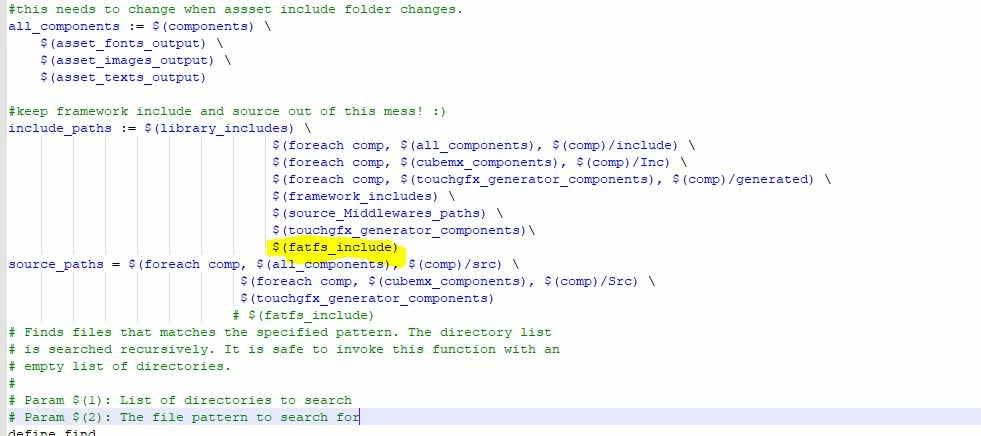
i have tried numerous time to add the file path for FatFS files in my project to makeFile, touch designer wont flash board because icant file the .Fatfs,h file.

i was advised by ST employee to add file path to the MakeFile , not being a software engineer i dont know how its written, below is the location where it goes i have it highlighted.

i cant find info anywhere that relates to this makefile format

thanks

Barry
0693W000000V9gmQAC.jpg

This topic has been closed for replies.

3 replies

Tesla DeLorean
Guru
April 2, 2020

I'm an electronics engineer...

Attach the actual makefile, not pictures of it.

Tips, Buy me a coffee, or three.. PayPal VenmoUp vote any posts that you find helpful, it shows what's working..
BO Re.1
BO Re.1Author
Associate III
April 2, 2020

Hi Clive1

thanks for the reply

i have attached the file

waclawek.jan
Super User
April 2, 2020

I too have a degree in electronics.

#keep framework include and source out of this mess! :)
include_paths := $(library_includes) \
								 $(foreach comp, $(all_components), $(comp)/include) \
								 $(foreach comp, $(cubemx_components), $(comp)/Inc) \
								 $(foreach comp, $(touchgfx_generator_components), $(comp)/generated) \
								 $(framework_includes) \
								 $(source_Middlewares_paths) \
								 $(touchgfx_generator_components)\
								 	$(os_path)/UseCanvassBuffer_Add_SDMMC/FATFS/App/fatfs.c

You are supposed to add a path to the directory (in modern micro$oft lingo, folder) where fatfs.h in question is located, not complete path to fatfs.c file.

You surely can navigate the directory structure on your PC.

JW

BO Re.1
BO Re.1Author
Associate III
April 2, 2020

Hi Jan,

thank you getting back to me

the fatFS.h file is in the folder as above, which I also tried, my problem is how to include ie what comes before it $( ??????) what is required in here , screen shot above was from one of attempts , and yes I can navigate the directory, just the root folder required not complete path

Pavel A.
Super User
April 2, 2020

If you can navigate the path, just put it there as is. (of course replace all backslashes to /). See if this works.

-- pa